Never call a client at 4 AM again.
Timezone Sync drops the live local time of every Contact and Company straight into the HubSpot record. Your reps see at a glance whether it's a good moment to call, email or book — no mental math, no Google searches, no awkward apologies.
 app.hubspot.com / contacts
Every misfired touch is a deal at risk.
Sales and CS teams pay a real tax every time someone reaches out at the wrong hour. The customer feels it, the rep feels it, and the conversion rate quietly drops.
Cold calls landing at 6 AM local time — instant churn of trust. Meeting invites sent in the wrong timezone, no-show rate climbs. Lifecycle emails delivered at 3 AM, sitting cold in the inbox by morning. Reps switching tabs to time.is and double-checking before every action.
One glance. The right moment. Every time.
Timezone Sync is a lightweight HubSpot CRM card that reads the timezone you already have on the Contact or Company (or infers it from country/state) and shows the current local time, updating live. No new system to learn, no extra workflow — it just sits where your team already works.
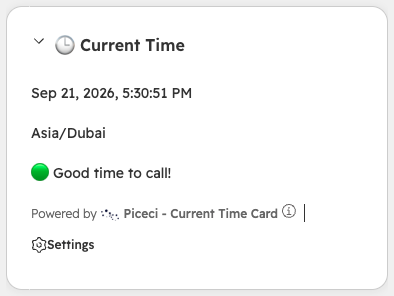
This is exactly what your reps will see.
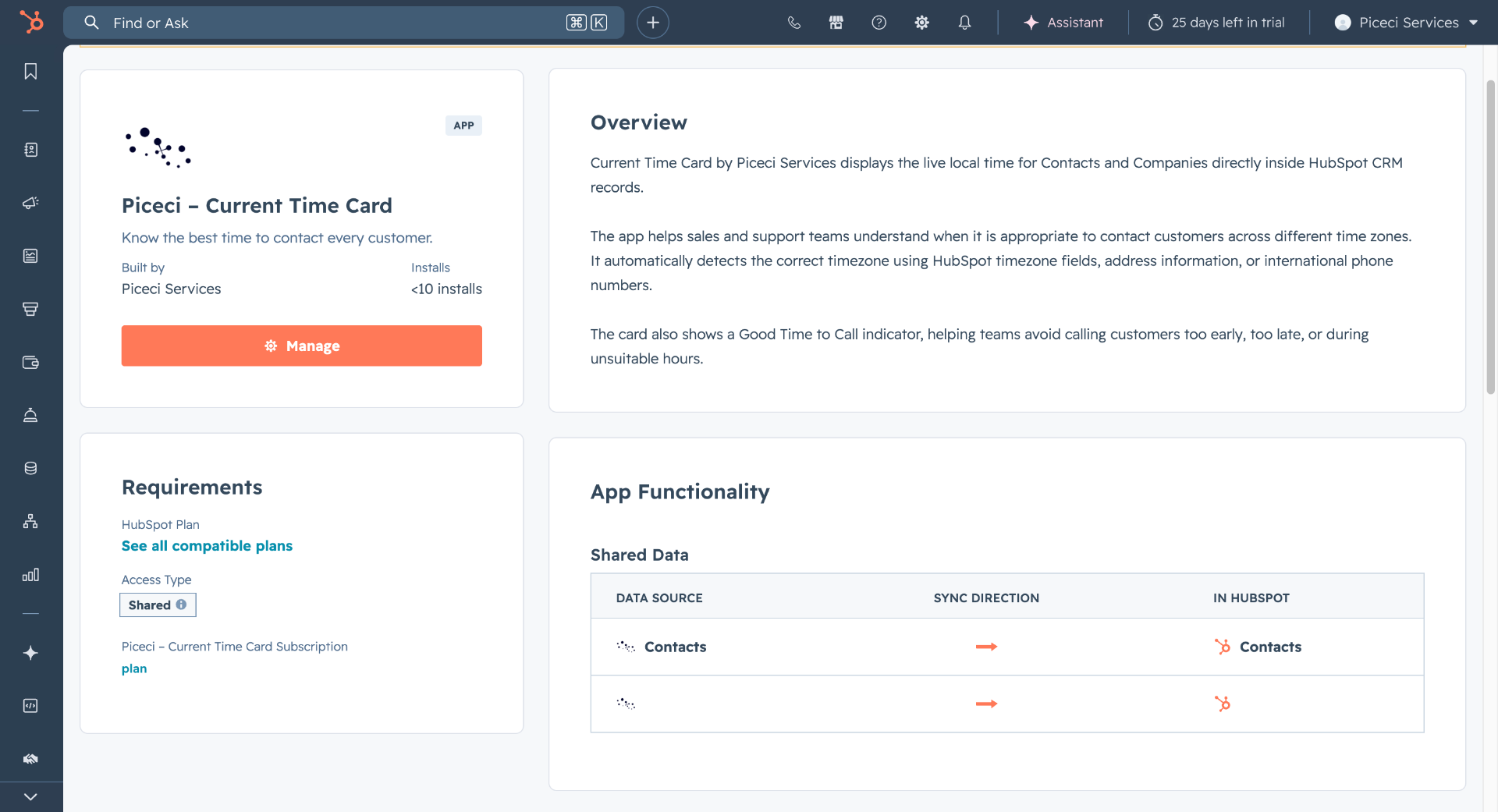
Real screenshots from a live HubSpot portal — the CRM card on both Contact and Company records, plus the app listing your admin sees during install.
See it live inside your HubSpot
30-minute call. We install the card together and answer every question you have.
Built like a HubSpot-native feature, because it is one.
Live local time
Seconds-accurate clock on every Contact and Company record, refreshed in real time.
IANA-grade timezones
Handles DST, half-hour offsets and edge cases — Newfoundland, Nepal, Iran included.
Smart fallback
When the timezone field is empty we infer it from country, state and city with high accuracy.
Zero setup for reps
Installed once at the portal level. Nothing to configure per user, per pipeline or per team.
Private by design
Reads only the timezone-relevant fields. No PII leaves your HubSpot portal.
Configurable card
Choose 12h/24h, date format, accent color and which extra cities to pin for context.
It's running on this page, right now.
Same engine that powers the HubSpot card. The clocks below tick every second using the same timezone logic — no fake screenshots.
- Rome · ItalyEurope/Rome · UTC+113:00:00
- Dubai · UAEAsia/Dubai · UTC+416:00:00
- New York · USAAmerica/New_York · UTC-507:00:00
- Singapore · SGAsia/Singapore · UTC+820:00:00
- São Paulo · BrazilAmerica/Sao_Paulo · UTC-309:00:00
- Sydney · AUAustralia/Sydney · UTC+1123:00:00
Pick a city. See if it's a good moment.
Same logic as the CRM card: live local time, day status, and the next overlap window with your own timezone.
Who's reachable right now, across the world.
The same logic that colors HubSpot CRM cards, applied to a global board. Refreshed every second.
 Piceci ServicesHubSpot CRM
From install to value in under 10 minutes.
Install on your portal
One-click install via the HubSpot Marketplace flow. We map the card to Contacts and Companies.
We auto-detect timezones
Existing records get backfilled using country/state. New records resolve automatically on creation.
Your team sees the clock
The CRM card appears on every record. Reps adjust outreach timing — and the numbers move.
Small UI change, measurable revenue impact.
Reaching out in the customer's working hours isn't a soft win — it's measurable. Higher answer rates, better meeting attendance, fewer rescheduled calls. Every team using Timezone Sync sees the same pattern within 30 days.

See it live inside your HubSpot
30-minute call. We install the card together and answer every question you have.
If your pipeline crosses a border, you need this.
Outbound sales
Stop burning leads with calls at the wrong hour. SDRs prioritize the right account at the right minute.
Customer success
Renewals, QBRs and check-ins land when the customer is actually awake and at their desk.
Lifecycle marketing
Trigger sequences in the recipient's morning — open rates and CTR jump immediately.
Sales engineering
Schedule demos and follow-ups across continents without spreadsheet gymnastics.
HubSpotHubSpot Solution PartnerNative to HubSpot, built by certified specialists.
We're an official HubSpot Solution Partner. Timezone Sync uses the public CRM Card extension API — no shady scripts, no token scraping, no maintenance debt. It works with Sales Hub, Service Hub and Marketing Hub at every tier.
Installs and uninstalls cleanly via the standard HubSpot connected-apps flow. Read-only access to timezone and location fields — nothing else is touched. Fully compatible with custom properties, custom objects and multi-portal setups. Roadmap includes Salesforce, Pipedrive and Microsoft Dynamics — HubSpot first.
This card mirrors the actual layout deployed on customer portals.
One is enough. All five make it perfect.
The card reads timezone-relevant properties in order of priority. Whichever your team already fills in, it just works — no manual mapping, no custom workflows.
Something off? 90% of the time it's one of these.
The card doesn't appear on records
Add it to the sidebar from Settings → Customize record for both Contact and Company, then reload the record page.
"Timezone not available"
The record has no usable field. Add at least one of: Time Zone, Country, State, City or an international phone number (with country prefix), then refresh.
The local time looks wrong
Check that Country/City are correct and that phone numbers use the international format (e.g. +971…). Filling in State helps a lot for US, RU, BR and AU records.
"Good time to call" seems off
The indicator uses 09:00–18:00 local, Mon–Fri by default. Contact support if you need custom working hours per team or portal.
Pick a time and we install Timezone Sync together.
30 minutes with Alessio. We show the card on a sample portal, then install it on yours in the same session.

- 30 minutes · no commitment
- Install in the same session
- Live calendar availability
Need a hand? We're one message away.
Install help, questions, feature requests — write to us directly. A HubSpot Solution Partner replies, usually within one business day.
Send us a message
Tell us your HubSpot portal ID and a short description — we'll take it from there.